Overview and purpose
ChunkVault / SafeVault is a secure storage backend built and deployed on a Raspberry Pi. It combines a browser dashboard with a FastAPI backend, PostgreSQL, SQLAlchemy, and Backblaze B2 object storage.
What the project does
-
Stages uploaded files and splits them into encrypted AES-GCM chunks.
-
Verifies chunks using SHA-256 hashes and stores them in object storage.
-
Reconstructs files only for authenticated owners.
-
Provides JWT authentication, user-based access control, and audit logs.
-
Includes upload and login abuse protection.
-
Provides dashboard controls for upload, download, and deletion.
-
Stores file and chunk reconstruction metadata in PostgreSQL.
Tools and infrastructure
| Part | Technology |
|---|---|
| Backend | FastAPI and SQLAlchemy |
| Database | PostgreSQL |
| Object storage | Backblaze B2 |
| Host | Raspberry Pi |
| Private remote access | Tailscale Serve |
| Browser sessions | HTTP-only authentication cookie |
| Dashboard templates | Jinja2 |
| Service management | systemd |
| Development environment | WSL Ubuntu and VS Code |
How it works
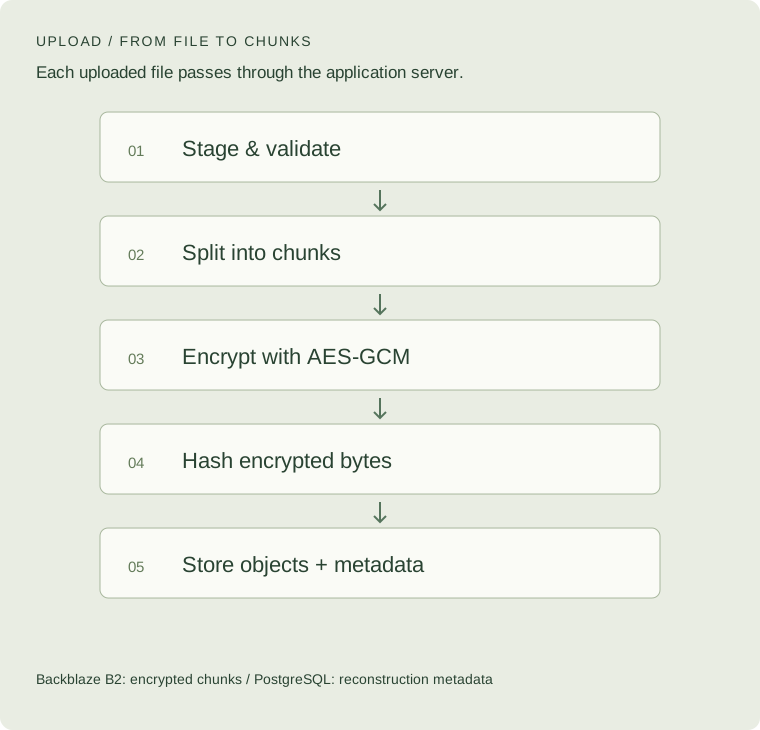
Uploaded files are staged, split into encrypted chunks, verified using SHA-256 hashes, and stored in object storage. The backend reconstructs files for authenticated owners.
Upload: from file to encrypted chunks
- The user logs in and selects a file in the dashboard.
- FastAPI saves the upload to a temporary staging file.
- The backend checks file size, upload limits, and estimated chunk count.
- PostgreSQL receives a file record with an uploading status.
- The staged file is read in configured-size chunks.
- Each chunk is encrypted with AES-GCM using a random nonce.
- The backend calculates a SHA-256 hash of the encrypted bytes.
- The encrypted chunk is uploaded to Backblaze B2.
- PostgreSQL records its index, object key, nonce, hash, encrypted size, and file relationship.
- Once all chunks are uploaded, the file is marked ready, an audit log is recorded, and the temporary staging file is removed.
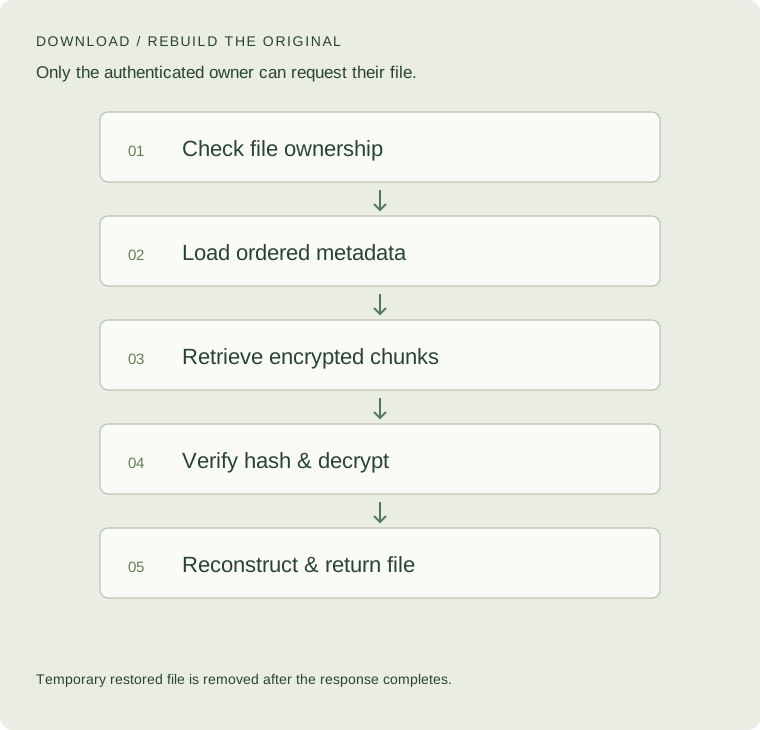
Download: reconstructing the original
- An authenticated user requests a download.
- The backend checks that the file belongs to that user.
- PostgreSQL provides the file metadata and chunk records in index order.
- The backend retrieves each encrypted chunk from Backblaze B2.
- It compares the encrypted bytes against the stored SHA-256 hash.
- The verified chunk is decrypted using AES-GCM.
- Plaintext chunks are written in order to a temporary restore file.
- The reconstructed file is returned to the user and a download audit log is recorded.
- The temporary restore file is removed after the response completes.
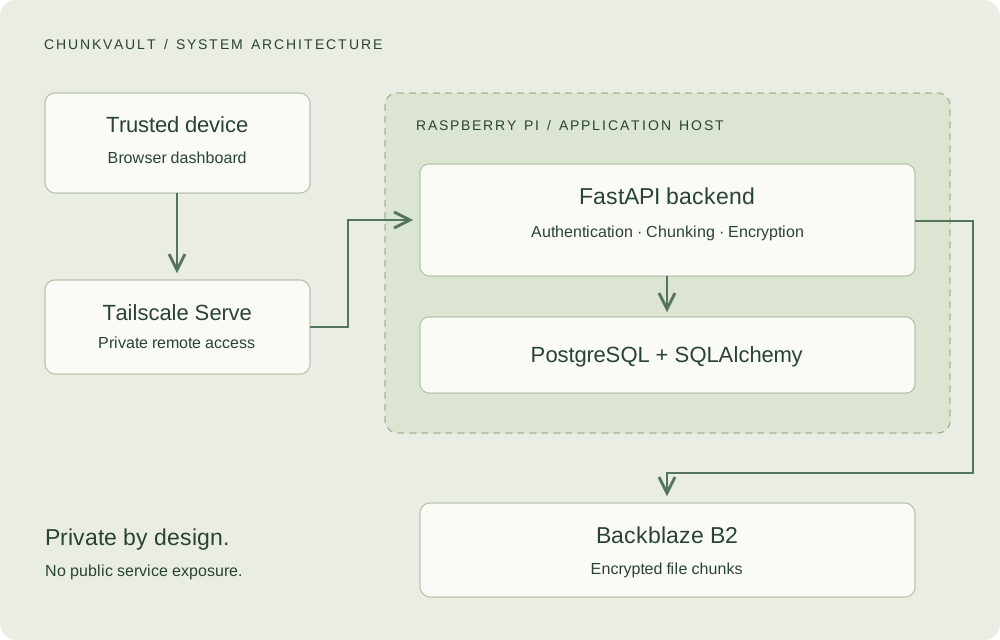
Access and deployment
The service uses production-safe configuration and private remote access through Tailscale Serve, without exposing the service publicly.
The application runs as a systemd service, with PostgreSQL on the same device. The deployment uses:
APP_ENV=productionand Uvicorn without--reload.- Disabled
/docs,/redoc, and/openapi.jsonendpoints. - A private Backblaze bucket.
- Environment secrets excluded from GitHub.
- Tailscale Serve without Tailscale Funnel or public router port forwarding.
Development happens locally in WSL. After testing, code is pushed to GitHub and pulled onto the Raspberry Pi, which remains in production mode.
Why I built it
Upload and download buttons hide a lot of backend work. I wanted to understand how a file moves through a storage system: how to handle it temporarily, split and encrypt it, keep track of its pieces, and reconstruct it for the right user.
The project also gave me a way to explore how a relational database and object storage work together. Encrypting the bytes is only one part of the problem. The system also needs consistent metadata, access controls, and a recovery plan.
The database’s responsibility
Backblaze B2 stores encrypted bytes. PostgreSQL stores how those bytes belong together.
| Data | Why it matters |
|---|---|
| User and file owner | Associates each file with its owner |
| Filename, size, and MIME type | Describes the original file |
| File status | Tracks whether the upload is ready |
| Chunk index | Preserves reconstruction order |
| Backblaze object key | Identifies the stored chunk |
| AES-GCM nonce | Provides the nonce needed for decryption |
| SHA-256 hash | Records the expected hash of the encrypted chunk |
| Encrypted chunk size | Describes the stored chunk |
| Audit logs | Records important file actions |
Restoring a file therefore depends on more than the object bucket. It also needs the database metadata and the original master encryption key.
Three parts must stay available: encrypted chunks, reconstruction metadata, and the encryption key. Losing one can make the stored files unrecoverable.
Security design
Authentication and ownership
Browser sessions use JWT authentication with an HTTP-only cookie. Passwords are hashed, and file operations are scoped to the authenticated user. Knowing a file identifier is not intended to grant access to another user’s files.
Abuse protection and visibility
The backend includes file-size limits, chunk-count limits, upload-rate limits, failed-login protection, and audit logs.
Development API documentation is disabled in production: Swagger UI, ReDoc, and the OpenAPI JSON endpoint are not available there. This reduces unnecessary exposure of development interfaces; it does not replace authentication or ownership checks.
Encryption boundary
Encryption happens on the application server, not in the browser. The Raspberry Pi handles plaintext staging and reconstructed files, and the application needs access to the encryption key.
This is not a client-side or end-to-end encryption claim. The application host and its secrets remain part of the system’s trust boundary.
Failure and recovery
| Failure | What it means |
|---|---|
| Raspberry Pi is offline | The dashboard and API are unavailable; the encrypted chunks remain in Backblaze B2 |
| Application code is lost | Code can be restored from GitHub |
| PostgreSQL is lost | Chunks may remain, but their ownership, order, object keys, nonces, and hashes may be unavailable |
| Master encryption key is lost | The encrypted chunks cannot be decrypted |
A recovery plan needs backups of PostgreSQL, application code, and the required secrets, including the master encryption key. Those secrets need protected backup storage.
Backup automation and restore-verification jobs are future work, rather than completed features.
Technical challenges
Keeping storage and metadata consistent
An upload writes to two separate systems: Backblaze B2 and PostgreSQL. A failure partway through must not leave an incomplete file marked ready.
It also raises a cleanup problem: chunks uploaded before the failure may need to be removed. This is an important consistency requirement, not a claim that every failure case has been independently verified.
Deletion and object versions
Deleting a file at the application level is not necessarily the same as permanently removing every object version. Older or hidden Backblaze object versions are a cleanup concern.
Full object-version cleanup remains a limitation. Bucket lifecycle settings and version-specific deletion need to be considered when extending the deletion workflow.
Separating development and production
API documentation is useful during development. The deployed service uses production configuration, while local development remains separate. That separation makes the intended deployment behaviour explicit.
Current limitations
The current implementation does not include:
- A full database migration system.
- Redis-backed distributed rate limiting.
- A public-registration approval flow.
- An advanced admin dashboard.
- File-sharing links.
- Client-side encryption in the browser.
- An automatic database backup scheduler.
- Full Backblaze object-version cleanup.
- High availability.
- An independent security review.
These boundaries matter when assessing the project. The implementation is a learning-focused private system, not a guarantee of suitability for public storage workloads.
What I learned
The project strengthened my understanding of backend API design, database schemas, object storage, authenticated encryption, integrity verification, authorization, audit logging, and self-hosted deployment.
The most useful lesson was how closely these pieces depend on one another. Encrypted objects are not enough if the database is missing, the key is lost, or ownership checks are wrong.
Encryption protects the stored bytes. Metadata, access control, deployment, and recovery planning determine whether the system remains usable and appropriately protected.
Future improvements
The next areas to explore are:
- Recovery: PostgreSQL backup automation and restore-verification jobs.
- Access management: admin-created users or invite-only registration.
- Abuse protection: Redis-backed rate limiting.
- Storage operations: usage reporting and complete object-version cleanup.
- Usability: upload progress, dashboard improvements, and file/folder organisation.
- Sharing and review: expiring share links and a complete threat model.
These are planned possibilities, not implemented features.